

The Alpha release of our app required an extensive exploration of available technology and how we can utilize it for our use. Keeping the principles of User Experience, we wanted the effortless accessibility of our app. Our initial approach was to develop a web applet that could be easily accessible through a URL, eliminating the tedious process of installation. One and I guess the only solution to this challenge was to use WebGL which delivers great 3D rendering support in the browsers. WebGL is great but unfortunately, Unity3D Augmented Reality (AR) deployment does not support WebGL in phone browsers. There are few alternatives to Unity3D for AR production, 8thwall.com, thisislarge.com and aframe.io are the most popular ones. However, diving into these frameworks required more time. I felt that if I have started exploring any of the above frameworks, all my time would have been spent investigating and learning new tools. on the other hand, I am a bit familiar with Unity3D and there are a huge support community and other online resources to rely on.
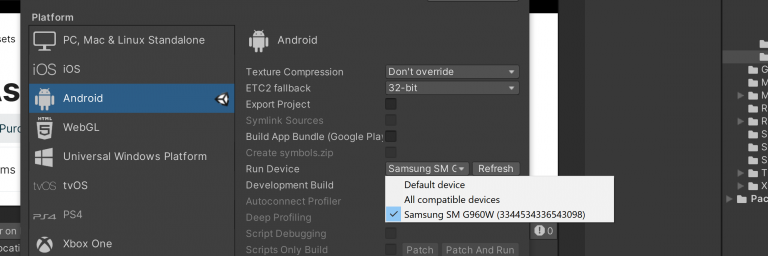
Before we build and run any code on our mobile devices, we need to make sure that our Unity3D has all components to deploy for mobile devices. For Android support, Unity needs Android SDK and for iPhone, it uses iOS SDK. Both plugins are available through Unity Hub or Unity website. After installing we need to make sure that our device (Android phone) is talking to Unity. To enable USB debugging in Android phones, we need to enable Developer options in Settings and check USB debugging.
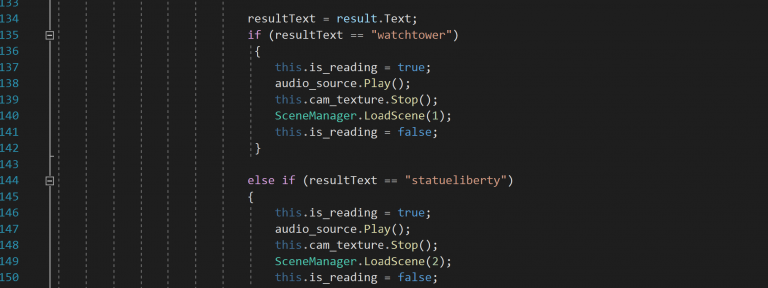
PocketPlane builds upon two major plugins from the Unity asset store, Easy QR Code by EasyGameStudio and AR + GPS Location by Daniel Fortes. These two plugins have made my life way easier. The QR plugin reads the QR code and performs an action which is to load a specific Unity scene in our case.
Each Unity scene has three major elements: the AR positioning gameObject, Directional light and the staged 3D model. The QR reader scans the QR code and jumps to its corresponding scene.
The alpha release was focusing on plugins and their communication which was done successfully. We did not focus on UI design elements in our alpha version. After getting feedback from test users we are working on resolving the issues which were experienced in the alpha release. For example, the size of the staged model and its Y-axis positioning and lighting. Our test users complain that the models are higher than the ground plane which is making the staged model hover over the ground and some test users complaints that they cannot see the model at all.